Background
The firm I work for has an in-house custom built CRM Solution for managing client and related data. The CRM tool is used by sales and operations teams for all aspects of the business such as tracking meetings, client report eligibility, account coverage, and client onboarding. It is crucial to have accurate information in order to reduce reputational or operational risk for the firm. Plus, it’s an annoying and frankly embarrassing experience to reach out to someone at the wrong place. As the firm evolved multiple CRM tools have been built for different parts of the business presenting the same data and allowing them to make changes, sadly all in slightly different ways.
Problem Statement
The majority of core data such as address, phone number, email, and employment for contacts and organizations have been sourced by firm employees rather than 3rd party data sources. In addition to the data being crowd sourced it has grown organically over the years as we onboarded other systems following acquisitions and mergers. But wait, there’s more (!), there are multiple tools to view and modify the same client data source. We needed a way to ensure data is added as accurately as possible providing important guardrails including meaningful, easy to understand messaging to people that could be readily plopped into the multiple CRMs for a standardized experience.
My Role
As lead product manager my role was to lead a cross functional team of business stakeholder, product owner, designer, and engineering for an end-to-end build out of a web forms library to allow users to add or change client data. These forms could be leveraged in any web application at our firm. At the time of this writing there were four CRMs to benefit from this library.
Day to day fun
- Conduct stakeholder interviews
- Steering committee meetings
- Document requirements
- Designer meetings
- Engineer meetings for scope and sequencing
- Prioritize
- Led quarterly program increment planning
- Run agile monthly sprints
- Communicate progress to stakeholders via meetings, demos, and email
- Collaborate with other squads to integrate into the CRMs.
Manage Email Example
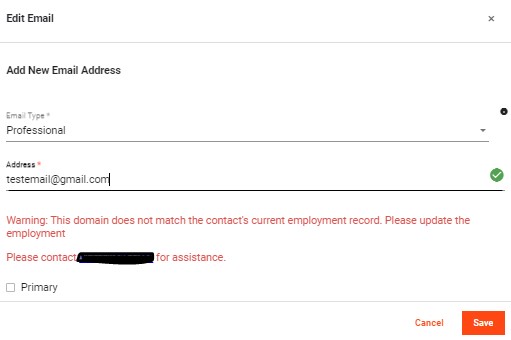
When an email is added or changed there are validations to see if the email domain matches the list of domains we have for their employer. Example, adding an email for a Ford Motor Company employee would show a warning if an email with GMC.com is added. Additionally, a check is performed to ensure the email is not already connected to another person in the system as that smells an awful like a duplicate.
Summary
After holding a series of meetings with business partners and product owner we agreed on the approach of a centralized library. Next we identified 15 critical features to be prioritized and built as data capture forms. An example is a pop-up form for the CRM to display for a person to view, add, or change client relationships with third party vendors. I then met with the design team to determine workflow, look and feel for the most complicated form which is the contact employment form. The overarching design requirements were that 1) user clicks on the form were kept to as few as possible and 2) validation checks were clear to understand and prevented bad data from being added. The design was then examined against the other forms in the queue for separate use cases to consider. I determined and got agreement that the workflow was fairly simple for the other forms so I was able to apply the design styling across the remaining forms and revisit with design for special cases.
In many cases form interactions had to take into account when existing data was loaded and did not pass newly added validations, for example editing an old email address that was missing the @ symbol would require the email to be corrected to proper format in order to save. The design was reviewed with the teams that would integrate our forms into their applications to collect feedback. I also held solution sessions with engineers from multiple application squads to cover integration requirements such as Angular versioning and upgrade timelines to determine any roadblocks to adoption.
Following MVP the big win was enhancing the forms to interact with one another. One great example was when an employment ended the user was asked to review emails related to the former employment to identify invalid emails. Another example is creating a new organization integrated the existing address form rather than copy code.
Outcome
The last of the 15 forms released within 18 months of starting the build out. Competing priorities slowed the completion roadmap but we still made our target goal of two years. Two of the four CRM applications at the firm integrated all or parts of our library. The other two applications are no longer being enhanced as they are being retired with the existing users migrating to the other two applications. The nightly data quality checks show reduced issues by 67% monthly.
Forms List
- Create New Person
- Change Person Name
- Create New Organization
- Change Organization Name, Website
- Change Organization Type
- Add/Change Person Phone
- Add/Change Person Email
- Add/Change Person Employment
- Add/Change Person Address
- Add/Change Organization Address and Phone
- Add/Change Organization Relationships
- Add/Change Person Relationships
- Manage Person Communication Preferences
- Manage Person Alias
- Manage Organization Alias
Learning
I learned a lot building out this product. First, welcoming input before starting went such a long way in everyone buying into the product. Related to that as forms were delivered there was a feeling of joined celebration rather than needing to socialize and explain what was built.
It was enormously helpful to talk through the various business processes and data issues that cropped up long after the data was entered. These discussions helped determine validation checks. For example, how did teams typically learn about and action email report bounce backs. From discussing this with teams that own this process downstream I was able to add an enhancement to our backlog to use these email bounces to inform and automatically set emails as inactive. Additionally, a backlog item was added to see if this information can be used to end employment.
I refined the art of demonstrating the form to people of varying points of view, think engineer versus average CRM user versus senior executive. A demo sounds simple but a carefully planned demo can make or break the first impression of a product. Getting technical with a person that is just trying to learn the product and background can be overwhelming and frustrating.
If I got a do over I would have worked closely with cross functional team to outline how to define success through data. Pre-release data numbers were not captured which would have enabled me to better quantify how much impact my product has made. Instead I had to use more general data validation numbers before and after product launch to weigh impact. This is definitely valuable but I would have loved to really be able to measure with more granularity such as “email data is x% improved since launch of this product.”
Manage Employment Example
View Current and Former Employments
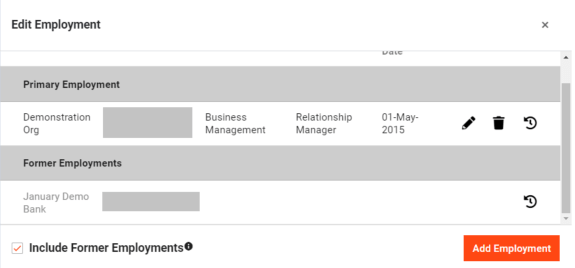
The list of current and former employments is presented in grid form. They can choose to make changes by clicking the pencil or trash can icons or add a new employment. Any client data form that allows multiple used this grid display first. Other examples are email, phone, address, and alias.
Add Employment
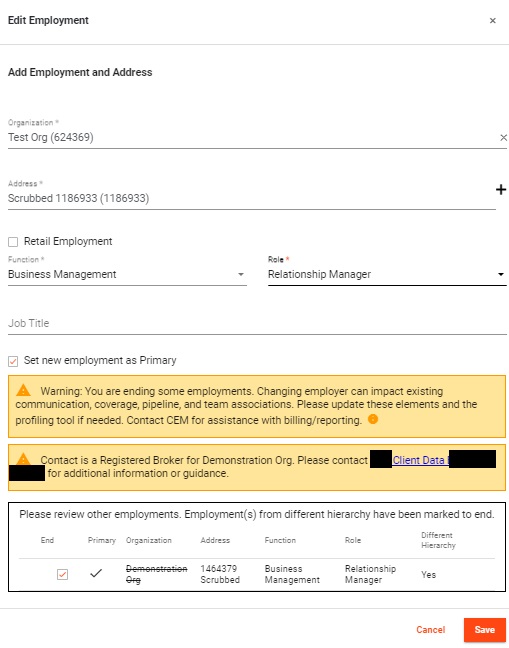
When adding a new employment the user is prompted to keep or end current employments. Also, the new employment firm is checked against existing employments to see if the person already works for an affiliated organization.
 Lisa Mirecki